
A new website ranks fastest for specific, low-competition keywords where the current top results are weak, not for the big head terms your established competitors own. You find them by mapping your topics, filtering by difficulty, then checking the live results by hand before you build a single page.
I'll walk you through the exact process I use when a site has little authority and no rankings yet.
You'll get the filters I set, the weak spots I look for in the results, a scoring template you can copy, and the order I build the first pages in.
You'll also see how to tell, in Search Console, whether your choices are working.
Key takeaways
- Start from your products, services and customer questions, not from a keyword tool.
- Use keyword difficulty as a first filter, then check the live results yourself. A score can't see a weak page.
- Score every keyword on business value, not just volume. A small keyword with buying intent often beats a big one you can't reach.
- Give each group of keywords one page, so your new pages don't compete with each other.
- Judge progress by impressions and average position first. Clicks follow later.
Why a new site can't win the head terms yet
Big, short keywords are usually held by sites with years of links and content behind them. A new site has neither, so it can publish an excellent page and still sit on page five for "running shoes" or "family lawyer".
Ahrefs' Keyword Difficulty score is based on the referring domains of the pages in the organic top 10. In plain terms, it estimates how many other sites link to what already ranks. If every page in the top 10 has hundreds of linking domains, you won't catch up quickly.
The good news is that most searches aren't head terms. Ahrefs found that almost 93% of the keywords in its US database get fewer than 10 searches a month. Those specific searches are where a new site gets its first foothold.
On the Cost Cut Meats project, I kept target keywords to Ahrefs KD under 20, with one primary keyword per page. Average position across the site moved from 16.9 to 7.3. Every site has its own challenges, so treat that threshold as a starting point to test, not a rule.
Step 1: Map your topics before you open a tool
Keyword tools are good at generating ideas and bad at knowing what you sell. So I start with a plain list of what the business does and what its customers worry about.
Write down three things:
- What you sell: every product category, service or plan, in the words customers use, not internal jargon.
- Who buys it: the main customer types, such as first-time buyers, trade customers or small businesses.
- What they ask before buying: the questions that come up in sales calls, emails, reviews and support tickets.
Each item becomes a topic, and each topic becomes a seed for the next step. A meat retailer might end up with seeds like "bulk beef", "brisket", "meal prep" and "grass-fed". A family law firm might have "divorce", "parenting orders", "property settlement" and "mediation".
Keep the list short at first. Five to eight topics you can genuinely cover beats forty you can't.
Step 2: Pull keyword ideas from more than one source
No single tool sees every search. Google has said for years that 15 percent of the searches it sees every day are new, so tool databases always lag behind real demand.
For each seed, I pull ideas from a mix of these:
- Ahrefs Keywords Explorer: the Matching terms report, plus its Questions tab for informational ideas.
- Semrush Keyword Magic Tool: useful as a second database, because the two tools often surface different long-tail phrases.
- Google Keyword Planner: "Discover new keywords" gives you Google's own suggestions, even if volumes show as ranges.
- Google itself: autocomplete, People Also Ask and related searches at the bottom of the results.
- Competitors: enter a slightly bigger competitor's domain in Ahrefs Site Explorer and open Organic keywords to see what they rank for.
- Your own data: if the site is a few months old, Search Console's Performance report already shows queries you get impressions for.
Export everything into one sheet with three columns: keyword, monthly volume and KD. Remove duplicates and anything irrelevant before you go further.
Don't throw out zero-volume keywords yet. A tool showing "0" often just means the database hasn't caught up with how people really search.
Step 3: Filter by difficulty, then question the score
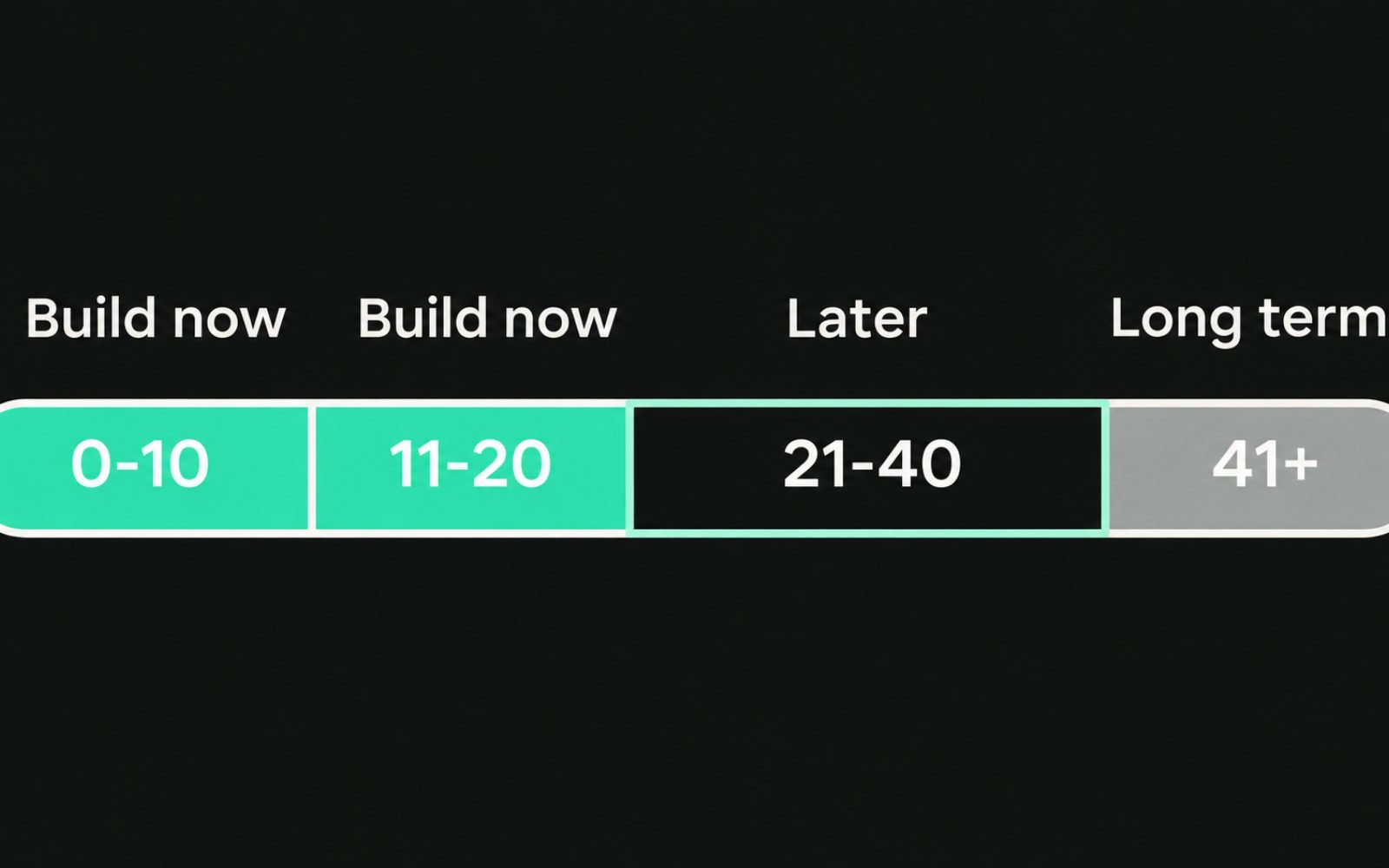
Difficulty is your first cut, not your final answer. Ahrefs itself describes KD as a first filter and notes that it ignores on-page factors.
Here's how I treat KD bands on a brand-new site:
| KD band | What it usually means | What I do on a new site |
|---|---|---|
| 0 to 10 | Top pages have few or no linking domains | Prime targets. Check the results, then build |
| 11 to 20 | Some links, still beatable with a strong page | Good targets if the intent fits and the results show weak spots |
| 21 to 40 | Established pages with steady links | Park them for months 4 to 12, or target a narrower variation now |
| 41 and above | Heavily linked, often big brands | Long-term goals. Build supporting pages first |
Two checks stop the score misleading you. First, a grey KD in Ahrefs means the results haven't been refreshed for a while, so look at the live page. Second, KD is calculated per keyword, while your page can rank for dozens of variations, so a low-KD keyword with a high-KD parent topic may be harder than it looks.
Step 4: Read the live results for weak spots

This is the step most people skip, and it's where new sites win. Search the keyword yourself, set to the country you're targeting, and study the first page.
You're looking for signs that Google is struggling to find a great answer:
| Signal | Why it's an opening |
|---|---|
| Forum threads (Reddit, Quora) in the top five | Google couldn't find a dedicated page that answers the question well |
| Pages that only partly match the search | A page built exactly for the query has a clear relevance advantage |
| Outdated pages (old years in titles, discontinued products) | Fresh, accurate content has room to move up |
| Thin pages under 300 words or with no real detail | A genuinely useful page can outdo them |
| Small or newer sites already ranking | Proof that authority isn't the deciding factor here |
| A page type you can create | If the results are all product pages and you sell the product, you're in |
Then check the format. If all ten results are local map listings, product pages or videos, and you can't make that kind of page, move on however low the KD is.
I go deeper on reading page types and angles in how to match search intent, because getting the page type wrong is the most common reason a "winnable" keyword never ranks.
Also note whether an AI Overview or People Also Ask box appears. They don't rule a keyword out, but they tell you the answer needs to be clear and quotable near the top of your page.
Step 5: Score each keyword on business value
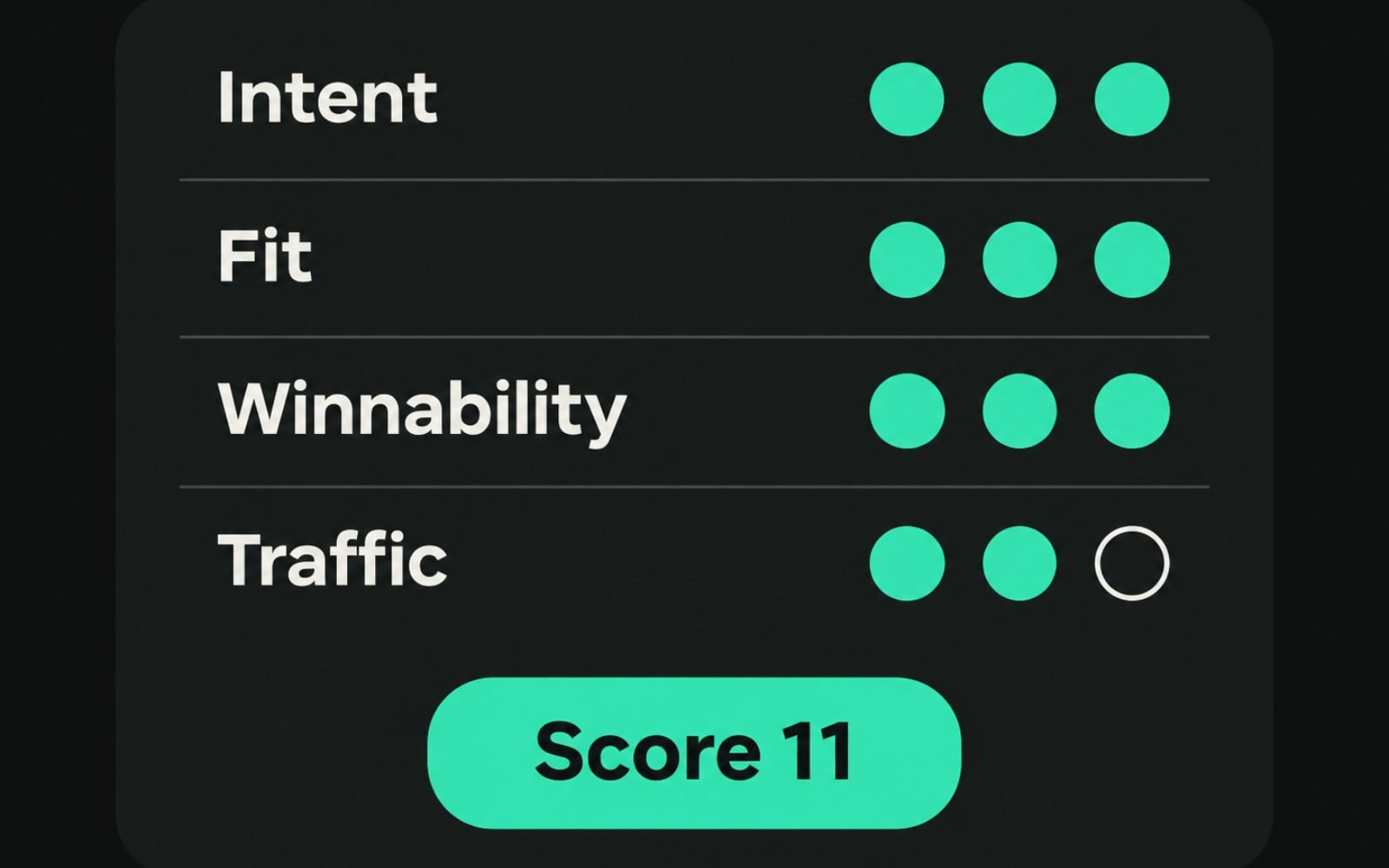
Volume is the least useful number on its own. I score every shortlisted keyword on four things, each from 1 to 3, and add them up.
| Factor | 1 point | 2 points | 3 points |
|---|---|---|---|
| Intent | Learning, no buying signal | Comparing options | Ready to buy, book or enquire |
| Fit | Loosely related to what you sell | Related product or service | Exactly what you sell |
| Winnability | KD 21+ and no weak spots | KD 11 to 20 or some weak spots | KD 0 to 10 and clear weak spots |
| Traffic potential | Very small, few variations | Moderate, some variations | Strong, many related searches |
For traffic potential, I use Ahrefs' Traffic Potential metric, the estimated organic traffic of the current #1 page. It's a better guide than one keyword's volume, because a ranking page picks up many related searches.
A worked example
Say you've just launched an online store selling standing desks. Here's how three keywords might score:
- "standing desk": intent 2, fit 3, winnability 1, traffic potential 3. Total 9, but the winnability score says it's a long-term goal.
- "standing desk for small spaces": intent 3, fit 3, winnability 3, traffic potential 2. Total 11. Build this first.
- "how tall should a standing desk be": intent 1, fit 2, winnability 3, traffic potential 2. Total 8. A useful supporting guide that links to the product range.
Anything scoring 10 or more goes to the top of the plan. To put a dollar figure on a shortlist, the free SEO value calculator turns estimated clicks into a rough revenue range.
Step 6: Group keywords and give each group one page
Your shortlist will contain lots of near-duplicates: "standing desk small space", "small standing desk", "compact standing desk". These almost always belong on one page.
Paste the shortlist into the keyword clustering tool for a fast first draft of groups. Then search the main keyword of each group. If two groups show mostly the same top results, merge them.
The full method, including how to spot when two similar phrases actually need separate pages, is in keyword clustering for page planning.
The rule I hold to is simple: one primary keyword per page, with close variations as secondary keywords on the same page. It's the fastest way to stop a small site splitting its few signals across competing URLs.
Which pages to build first
A new site has limited time and no authority to waste. I build in this order:
- Money pages for high-scoring, buy-ready keywords. For a store, these are usually specific category or collection pages. For a service business, the core service pages.
- Supporting guides for question keywords in the same topic. Each one links to the money page it supports.
- Comparison and "best" pages once you have enough product or service detail to write them honestly.
- Broader hub pages that tie a topic together, after the specific pages exist to link to.
For online stores, the first step often means narrower collections built around specific searches. I cover how to choose and write them in long-tail keywords for category pages.
Finish one topic before starting the next. Ten connected pages on one subject build relevance faster than ten scattered pages on ten subjects.
How to tell whether your keyword choices are working
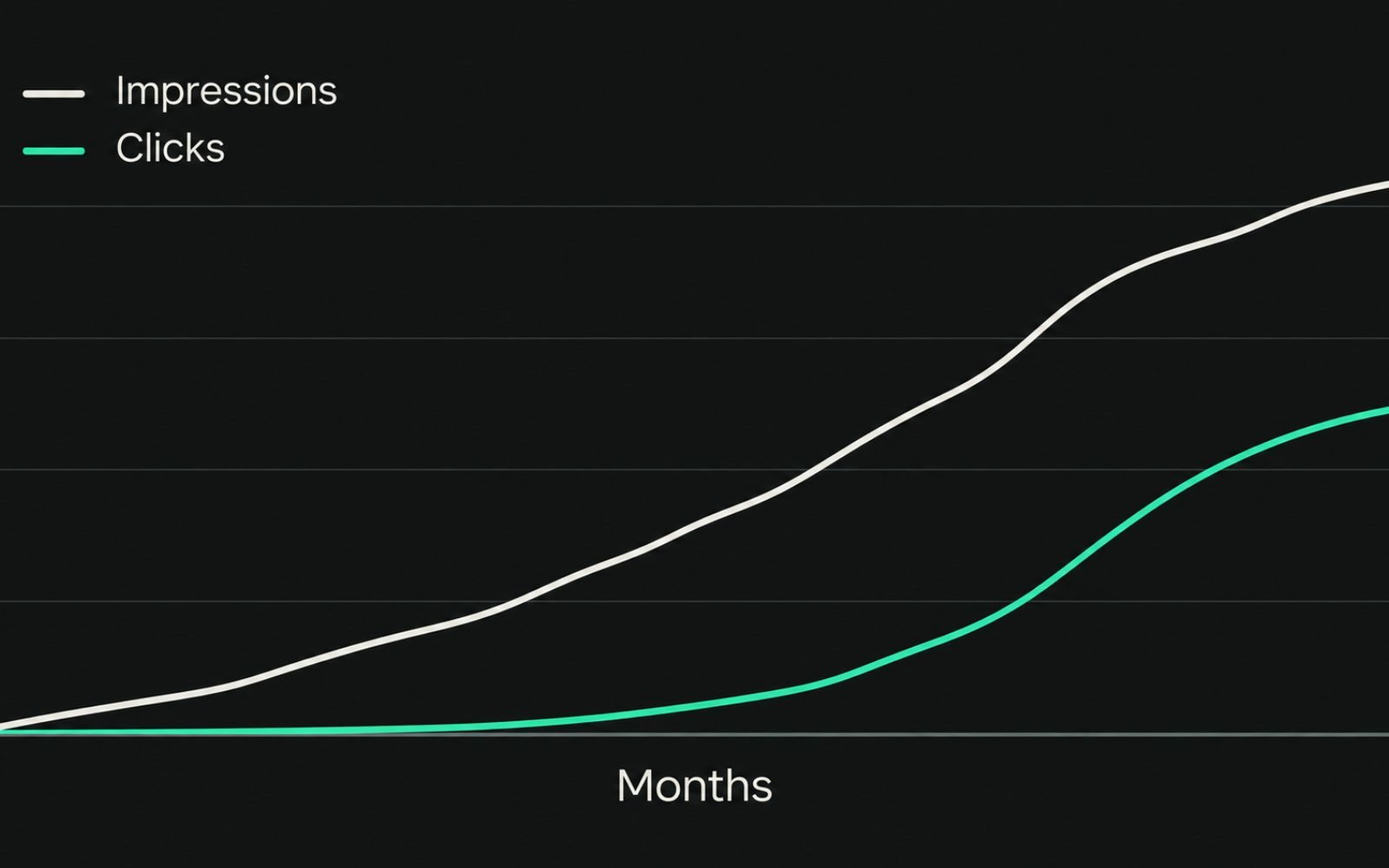
Rankings for a new site rarely arrive all at once, and I won't promise a timeline. What you can do is watch the right signals in the right order.
- Impressions: in Search Console, open Performance, then Search results, and filter by page. Rising impressions show Google is testing the page for your target queries.
- Average position: watch it move from the 30s and 20s towards the top 10 for your primary keyword.
- Queries per page: a healthy page starts ranking for variations you didn't target. That's traffic potential becoming real.
- Clicks and conversions: these come last, once positions reach the first page.
To track a whole topic at once, use a regex query filter. Search Console has supported regular expression filters for queries and pages since 2021. For example:
standing desk|sit stand desk|height adjustable deskOn Cost Cut Meats, monthly impressions grew from 9.59K to 517K between June and October 2026. Over the same period, Google clicks rose from 117 a month to 3,788.
If a page has had steady impressions for a few months but sits stuck outside the top 20, recheck the intent and the competition before writing anything new.
Common mistakes I see on new sites
- Chasing volume. Building the first ten pages around the biggest keywords in the niche, then waiting for rankings that never come.
- Trusting KD blindly. A KD of 5 means nothing if the results are all a page type you can't build.
- One page per phrasing. Separate pages, for example, "best X for Y" and "top X for Y" compete with each other and both lose.
- Ignoring intent. Writing a blog post for a keyword where Google only shows product pages.
- Spreading too thin. Publishing across every topic at once instead of finishing one cluster.
- Never revisiting the list. As your site earns links and rankings, keywords you parked at KD 30 become realistic. Review the list every quarter.
The bottom line
New sites win by being the best answer to specific searches, one page at a time.
Map your topics, filter by difficulty, read the live results and score each keyword on what it's worth to the business. Then build one strong page per group and finish one topic before starting the next.
If you'd rather have the research, scoring and page plan done for you, see how I approach SEO strategy and keyword research.
FAQs
1. What is a good keyword difficulty for a new website?
I start new sites on Ahrefs KD under 20, and ideally under 10 for the first few pages. Treat that as a starting filter, then check the live results, because difficulty scores don't measure how good the ranking pages are.
2. How many keywords should a new site target?
Start with one topic and five to ten pages you can make genuinely useful. Each page has one primary keyword plus close variations, so that's often 30 to 100 keywords in total.
3. Should a new website target zero-volume keywords?
Sometimes. If customers ask the question, the results are weak and the topic fits what you sell, a "zero volume" keyword can still bring buyers. Tool databases miss a lot of real searches, especially very specific ones.
4. How long does it take a new website to rank?
There's no fixed timeline, and anyone who guarantees one is guessing. It depends on competition, how useful your pages are and how quickly you earn links. Watch impressions and average position in Search Console for early signs.
5. Can I find keywords without paid tools?
Yes. Google Keyword Planner, autocomplete, People Also Ask and Search Console are free. You'll lose difficulty scores, so reading the results by hand matters even more.
6. Is search volume the most important keyword metric?
No. Intent and winnability matter more for a new site. A keyword with 50 searches from ready-to-buy customers can be worth more than one with 5,000 you'll never rank for.