I use AI for the slow, repeatable parts of SEO, such as reading search results, sorting keywords, assembling briefs, writing first drafts and pulling reports, and I keep every decision about strategy, facts, brand voice and publishing with a person. That split is what lets the work move fast without letting quality slip.
AI is very good at volume. It is not accountable for what goes live, and it will state a wrong fact with complete confidence.
Below, I walk through a full month of SEO work and show exactly where AI helps at each stage, where a person signs off, and the written checks that catch mistakes before customers see them.
You'll also get a brief template, a sample drafting prompt, my pre-publish checklist and the results this workflow has produced on the four sites I currently manage.
Key takeaways
- Give AI the jobs that are slow and repeatable: research, sorting, first drafts, formatting and reporting.
- Keep people on the decisions that cost money if they're wrong: which pages to build, what's true, how the brand sounds and what goes live.
- Build sign-off gates into the month. Mine sit at the keyword shortlist, every draft and every theme change.
- Anything AI can't verify becomes a visible placeholder, and nothing publishes with one left in.
- Google's concern is unhelpful, inaccurate or mass-produced content, not the tool that wrote it. Its guidance now calls manual fact-checking of AI content critical.
- Measure the workflow by outcomes such as clicks, positions, site health and AI citations, not by how many pages it produced.
What AI does well in SEO, and where it fails
AI is strongest where the work is pattern-heavy and the output is easy to check. It is weakest where the answer depends on facts it can't see or on judgement about a specific business.
Google explains why in its guidance on generative AI content: language models predict a likely sequence of words rather than retrieving facts, so their output can contain errors. That one point shapes the whole workflow.
| Task | What AI does | What a person does | Risk if nobody checks |
|---|---|---|---|
| Reading search results | Summarises who ranks, page types, People Also Ask and AI Overviews | Decides whether the business can and should compete | Chasing keywords that bring no customers |
| Keyword research | Pulls, cleans, groups and filters large keyword lists | Approves the shortlist against business goals | Pages competing with each other |
| Content briefs | Assembles the outline, entities, questions and link targets | Adds first-hand notes, angle and facts | Generic pages that repeat what already ranks |
| First drafts | Writes to the brief and brand guidelines | Edits, fact-checks and approves | Wrong prices, specs or safety claims going live |
| Metadata and alt text | Drafts titles, descriptions and alt text | Checks them against the page | Misleading search snippets |
| Technical fixes | Finds issues and proposes code changes | Tests on a preview copy, then publishes | A broken live theme |
| Reporting | Pulls the same views every month and compares them with a baseline | Explains what changed and what to do next | Reading noise as a trend |
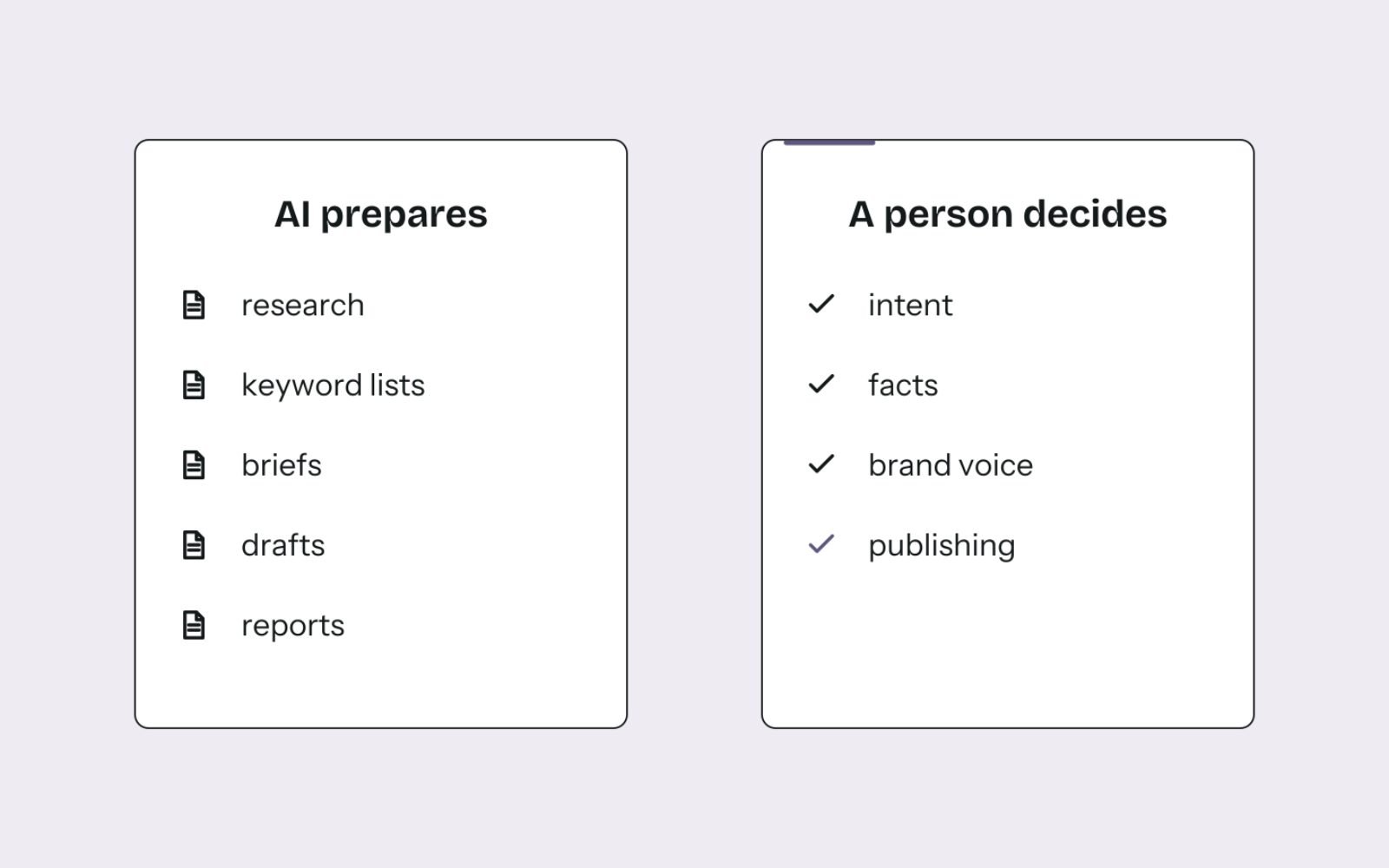
The pattern is the same in every row: AI prepares, a person decides. The rest of the workflow is built around that rule.
The monthly loop and its three sign-off gates
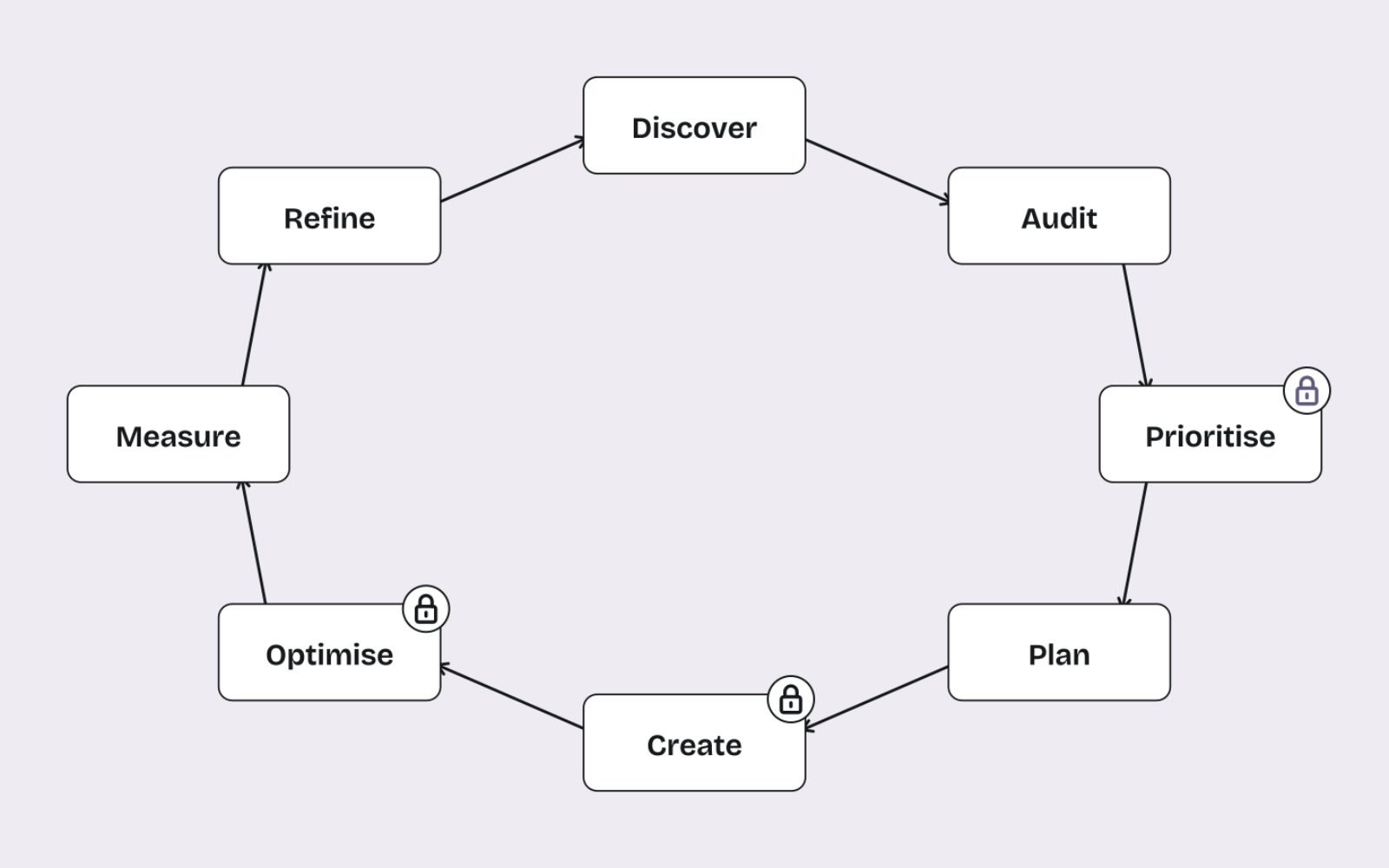
Each month the work moves through the eight steps of my monthly SEO workflow. How much time each step gets depends on the site and the problems it has, so a new store and an established one spend their hours very differently.
- Discover: learn the business, its customers, its margins and what it sells most.
- Audit: crawl the site and check indexing, speed, structure and content gaps.
- Prioritise: choose the keywords and fixes that are worth the effort this month.
- Plan: turn each chosen keyword into a brief.
- Create: write, edit and fact-check the content.
- Optimise: add internal links, fix technical issues and improve existing pages.
- Measure: report against a fixed baseline.
- Refine: feed what worked, and what didn't, into next month's plan.
AI assists at every step. Three steps wait for a person before anything moves on:
- The keyword shortlist (Prioritise). The client approves which pages get built before any writing starts.
- Every draft (Create). Nothing is published until it has been reviewed.
- Theme and code changes (Optimise). Fixes are made on a preview copy, and a person publishes them.
Those gates sit where a mistake would be expensive. Everything else can move quickly.
How AI fits into each stage
Here is what the work looks like in practice, stage by stage, with the inputs I give the tools and the checks I run on what comes back.
Discover and audit
AI is useful early for reading a lot of material quickly: the client's product range, past content, competitor pages and their own customer questions. I ask for a summary of who the customers are and what they ask about, then check it against what the client tells me.
For the audit, the data comes from tools, not from AI. Ahrefs Site Audit and Google Search Console show crawl errors, orphan pages, redirect chains and indexing problems. AI then helps me group hundreds of issues into a short list of fixes, ordered by impact.
Prioritise: keyword research
I start with one topic cluster at a time. AI checks the live search results first: who ranks, which page types win, what People Also Ask shows and whether an AI Overview appears. Then it pulls matching and related terms from Ahrefs and Google Keyword Planner.
- Remove anything off-topic, branded for a competitor or impossible to rank for.
- For newer sites, keep keywords with an Ahrefs Keyword Difficulty under 20, which is how I approach finding keywords a new website can rank for.
- Group keywords that share the same search results, so one page targets one group.
- Give each page one primary keyword, so new pages don't compete with each other.
- Score each group on business value and send the shortlist to the client for approval.
Grouping is where AI saves the most time, but I still check the groups against the live results. My process for clustering keywords into pages covers that check in detail.
Plan: content briefs
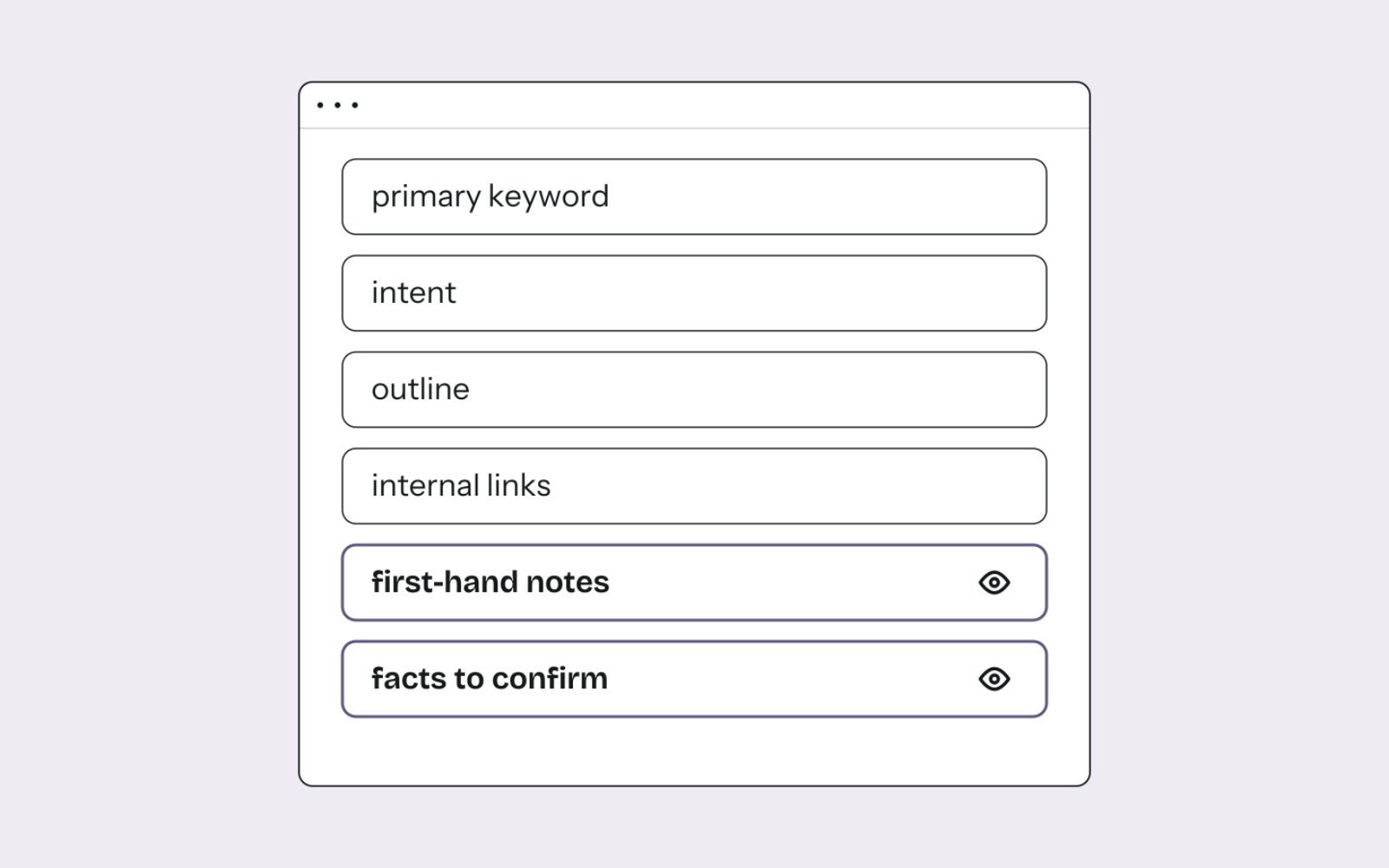
A good brief is the single biggest factor in draft quality. AI assembles most of it in minutes, and I add the parts only a person can supply.
CONTENT BRIEF
Primary keyword:      [one keyword]
Secondary keywords:   [3-6 from the same cluster]
Search intent:        [informational / commercial / transactional]
Page type to match:   [guide, category page, comparison...]
Meta title:           [under 60 characters]
Top 10 review:        [what ranking pages cover, and what they miss]
Entities to cover:    [products, terms, measurements]
Questions to answer:  [from People Also Ask and customer emails]
Outline:              [H2s and H3s]
Internal links:       [3-7 live pages, with anchor text]
First-hand notes:     [prices, photos, results, opinions: added by a person]
Facts to confirm:     [anything the client must verify]
The last two lines matter most. They are where the page stops being a rewrite of the top results and starts carrying information only this business has.
Create: drafts and graphics
Claude and ChatGPT write first drafts from the brief and each brand's written guidelines. The guidelines cover spelling, tone, banned phrases, the answer-first opening, FAQ format and internal linking rules. Higgsfield helps turn a client's own photos into article graphics.
A drafting prompt works best when it hands over the brief and the rules rather than asking for "an article about X":
Write the article in the attached brief.
Follow the attached brand guidelines exactly (spelling, tone, banned phrases).
Open with a direct answer to the primary keyword in the first two sentences.
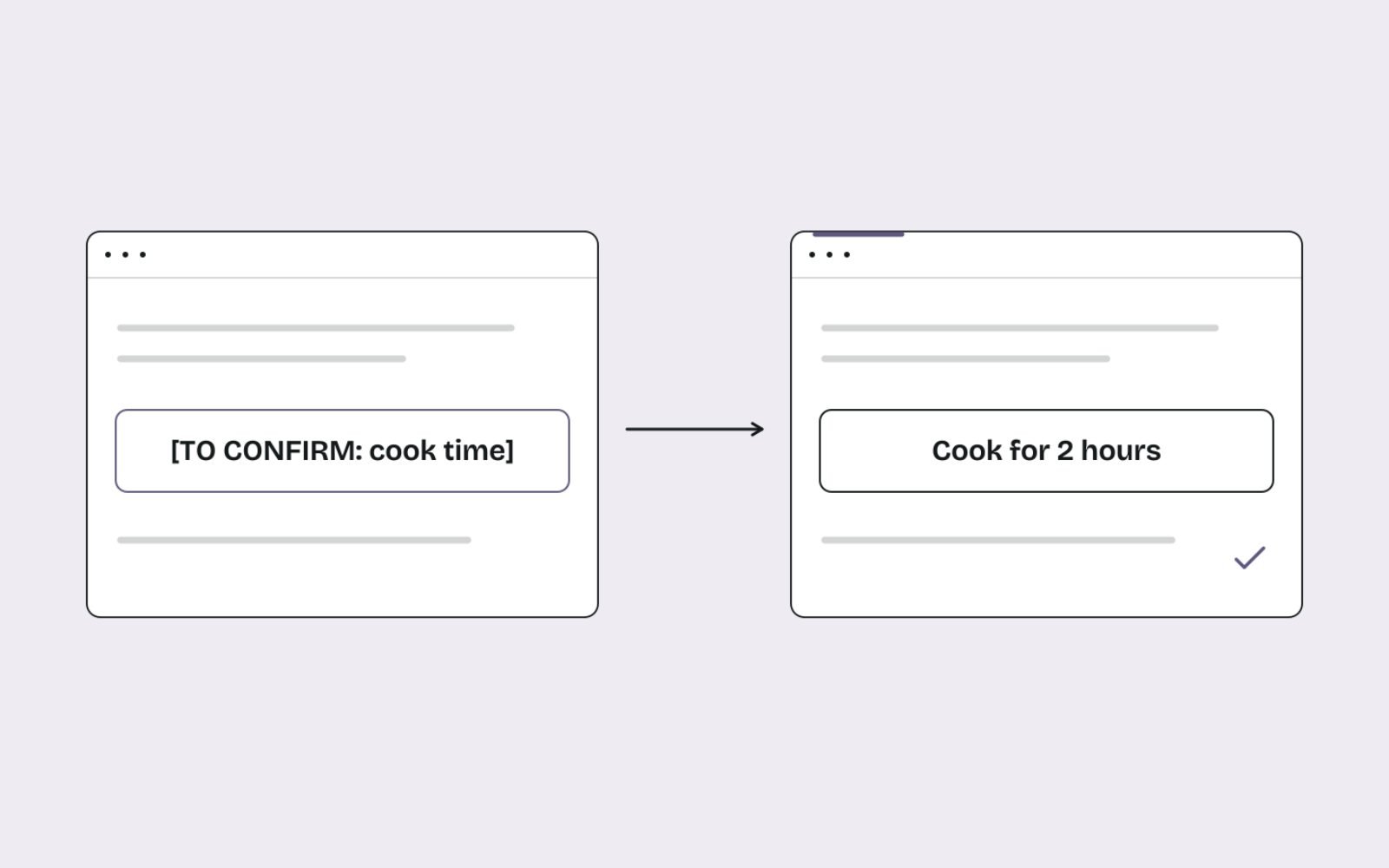
Use only facts from the brief. If a fact is missing, write [TO CONFIRM: what is needed].
Add 3-7 internal links from the brief's list, one per section at most.
End with 5-7 FAQs that match the brief's questions.
The placeholder instruction is the important line. It turns a guess into a visible gap that a person has to fill.
Optimise: internal links and technical fixes
AI is good at finding internal link opportunities across hundreds of pages, and at proposing the exact sentence where a link fits. I check each one so every anchor phrase points to one page only. The steps I use are the same ones behind fixing orphan pages and internal links on Shopify.
For theme code, AI drafts the change and I apply it to a preview copy of the theme first. Only after checking it on desktop and mobile does a person publish it.
Measure and refine
Each month the same views come out of Search Console, Google Analytics 4 and Ahrefs, compared with a fixed baseline. AI pulls the numbers and drafts the summary, but exact figures always come from the data export, never from reading a chart by eye.
The refine step is mine. I decide which pages to update, which to merge and what to try next month, based on what actually moved.
The decisions a person always makes
AI is good at patterns. It is not accountable for outcomes, and it doesn't know the business. These decisions stay with a person:
- Search intent: whether a page will earn sales or enquiries, or only bring traffic that leaves.
- Facts: prices, specifications, safety advice, cooking times and sourcing claims must be true and current.
- Brand voice: the tone and terms a business is known for, including what it would never say.
- Experience: the first-hand details, photos and opinions that make a page genuinely useful.
- Publishing: what goes live, and when.
If a decision would embarrass the client or cost them money when wrong, a person makes it.
The guardrails that keep quality high
Most AI content problems come from a missing check, not a bad tool. These are the written rules I follow on every site.
- Unverified facts become placeholders. Anything AI can't confirm, such as a cook time, a supplier spec or a certificate, becomes a visible
[TO CONFIRM]note, and nothing goes live with one left in. - Theme changes go to a preview copy first, so the live site never breaks mid-edit.
- Every change is re-read after it lands, so errors are caught in minutes rather than weeks.
- Content plan rows are added or updated, never overwritten, so the record of what was planned and published stays intact.
- Every mistake becomes a written rule, so the same problem doesn't happen twice.
Before any page is published, it goes through this checklist:
| Check | What I look for | Why it matters |
|---|---|---|
| Placeholders | No [TO CONFIRM] notes left anywhere | Unverified facts never reach customers |
| Facts and numbers | Every price, spec and statistic matches its source | Wrong facts cost trust and sales |
| Intent | The page type matches what ranks for the keyword | The wrong format rarely ranks |
| First-hand value | At least one detail only this business could provide | Separates the page from a rewrite |
| Brand voice | Spelling, tone and banned phrases follow the guidelines | Keeps the brand consistent |
| Links | 3-7 internal links to live pages, each anchor used for one page only | Helps readers and crawlers, avoids confusion |
| Metadata | Title, meta description and alt text describe the page accurately | These show in search results too |
| Structured data | Markup validates and matches what's on the page | Keeps the page eligible for rich results |
What Google says about AI-generated content
Google doesn't ban AI-assisted content. Its position is that the method matters less than whether the result is helpful, accurate and made for people. Its guidance does set out clear limits:
- Scale without value is spam. Google's March 2024 update introduced a scaled content abuse policy that covers mass-produced pages made mainly to manipulate rankings, however they were produced.
- Fact-checking is expected. The guidance now calls it critical to manually fact-check and review all AI-generated content before publishing, and that includes title elements, meta descriptions, structured data and image alt text.
- Context helps readers. Google suggests explaining how content was created where it makes sense, which matches the "Who, How and Why" questions in its advice on creating helpful, people-first content.
- Shopping has its own rules. Merchant Center requires AI-generated product images to carry IPTC TrainedAlgorithmicMedia metadata, and AI-generated titles and descriptions to be labelled as AI-generated.
None of this stops you using AI. It does mean the review step isn't optional, which is why it sits at the centre of the workflow rather than at the end.
Common mistakes when using AI for SEO
These are the problems I see most often when a business tries to use AI for SEO without a process around it.
- Publishing drafts unedited. The page reads fine, but a price, a measurement or a claim is wrong.
- Asking for "an article about X". Without a brief, AI writes the average of what already ranks, so the page has nothing new to offer.
- Letting AI pick the keywords. It finds keywords easily, but it can't tell which ones bring customers to this business.
- Producing pages faster than they can be checked. Volume grows, quality drops, and the site drifts towards the scaled content Google warns about.
- Trusting AI with numbers. Report figures should come from the data export, not from a model's reading of a chart.
- Skipping the brand guidelines. Every draft then needs heavy editing, and most of the time saved is lost.
Each of these is a process gap, not a tool problem, so each has a fix in the guardrails above. If you'd like the content side handled for you, content writing from briefs follows these same checks.
How to measure whether the workflow is working
The number of pages published says nothing about whether the workflow works. I judge it by what changes for the business.
| Signal | Where it comes from | What good looks like |
|---|---|---|
| Clicks and impressions | Google Search Console, Performance report | A steady rise against the baseline month |
| Average position | Google Search Console | Target pages moving onto page one |
| Enquiries or revenue from organic search | Google Analytics 4 | Growth that follows the traffic |
| Site health | Ahrefs Site Audit | Errors fixed and kept at zero |
| AI citations | Ahrefs AI responses, Search Console AI reporting | More answers citing the site over time |
| Edit rate | My own review notes | Fewer factual fixes per draft as briefs improve |
The last row is a useful internal check. If drafts need fewer corrections each month, the briefs and guidelines are doing their job.
AI citations are worth watching as more searches end in an AI answer. My method for tracking AI mentions and citations covers the tools and the monthly routine.
What this produced on live sites
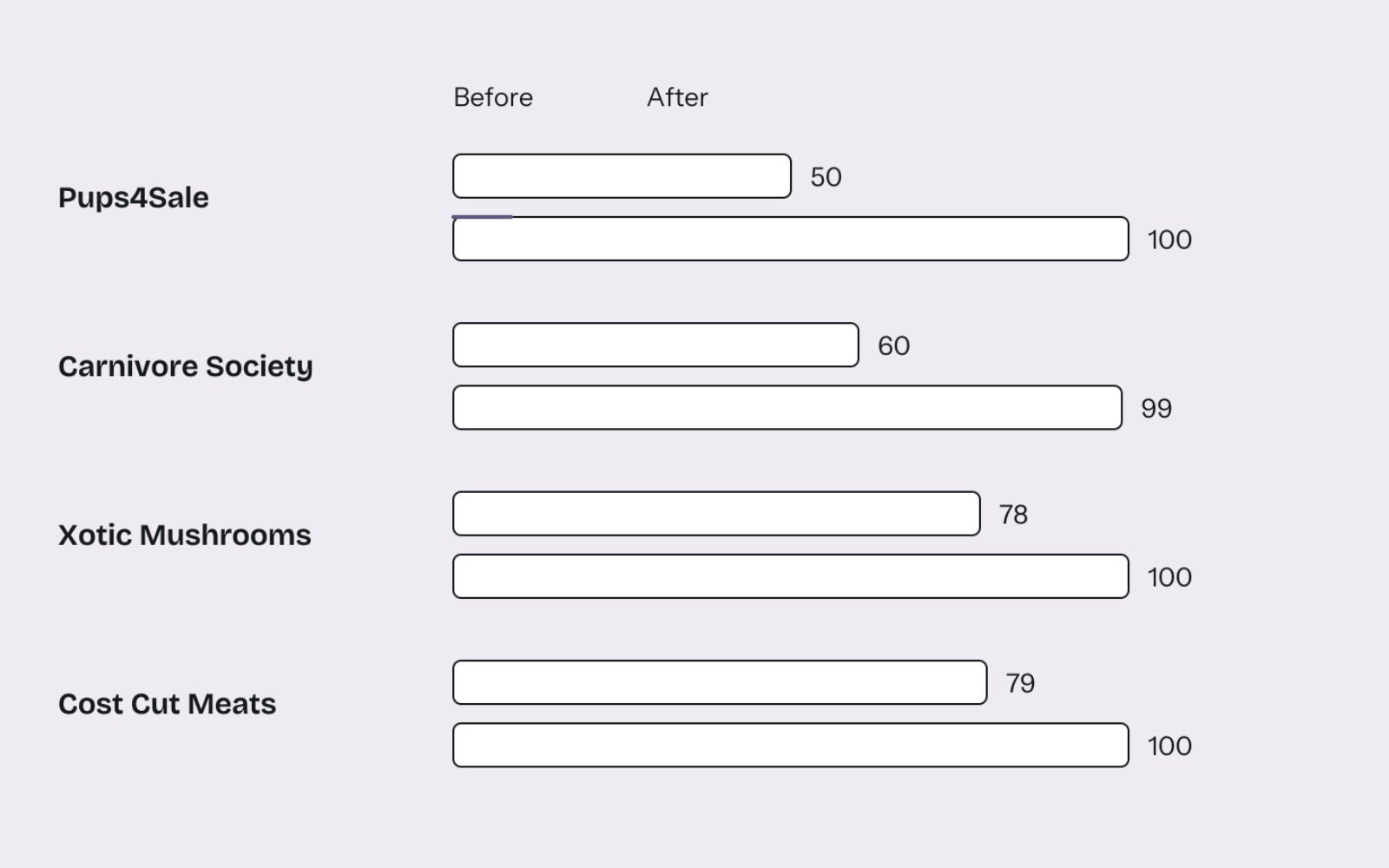
I run this workflow on four sites at the moment, each with different problems, so the results show up in different places. Technical health is the easiest to compare across all four:
| Site | What it is | Site Health before | Site Health after |
|---|---|---|---|
| Pups4Sale | UK and Australian puppy marketplace, 3,214 URLs | 50 (Jun 2026) | 100 (Nov 2026) |
| Carnivore Society | Australian bulk meat retailer | 60 | 99 |
| Xotic Mushrooms | Australian Lion's Mane grower, 391 URLs | 78 | 100 |
| Cost Cut Meats | Australian online meat retailer on Shopify | 79 (16 Oct 2026) | 100 (22 Oct 2026) |
AI visibility is growing too. AI tools cite Carnivore Society about 1,400 times, which shows the clear, answer-first structure is being picked up beyond ordinary search results.
Content volume shows most clearly on Cost Cut Meats, an Australian online meat retailer on Shopify. There the workflow produced 163 live pieces of content in five months, 110 blog posts and 53 recipes, each written from a brief, with internal linking and technical fixes alongside.
| Measure | Before | After | Source |
|---|---|---|---|
| Google clicks per month | 117 (Jun 2026) | 3,788 (Oct 2026) | Search Console |
| Impressions per month | 9.59K (Jun 2026) | 517K (Oct 2026) | Search Console |
| Average position | 16.9 | 7.3 | Search Console |
| Site Health | 79 (16 Oct) | 100 (22 Oct) | Ahrefs |
| Orphan pages | 45 | 0 | Ahrefs |
By 6 November 2026, Ahrefs counted 1,115 AI answers citing the site, 536 of them from Google AI Overviews. The Cost Cut Meats case study has the sources and screenshots for every figure.
Every site has its own challenges, so the same workflow produces different results elsewhere. What carries over is the structure: AI for speed, people for decisions, and written checks in between.
The bottom line
AI makes SEO faster. It doesn't make it right.
Use it for research, sorting, drafting and reporting. Keep people on intent, facts, voice and publishing, and write your checks down so they happen every time.
If you'd like this workflow applied to your site, see how my AI SEO and GEO service works, or get in touch about your project.
FAQs
1. Does Google penalise AI-written content?
No, not for being AI-written. Google's guidance focuses on whether content is helpful, accurate and made for people. Mass-producing pages mainly to manipulate rankings can break its scaled content abuse policy, however they were made.
2. Which AI tools do you use for SEO?
Claude and ChatGPT for research, briefs and drafts, and Higgsfield for graphics made from a client's own photos. Ahrefs, Google Search Console, Google Analytics 4 and Google Keyword Planner supply the data.
3. Can AI do keyword research on its own?
It can gather, clean and group keywords quickly, but it can't judge which keywords bring customers to a particular business. I use it to build the list and a person approves the shortlist.
4. How much time does AI save in an SEO workflow?
The biggest savings are in research, keyword grouping, briefs and first drafts. I put that time back into editing, fact-checking and strategy, which is where quality comes from.
5. Should you tell readers when AI helped write content?
Google suggests giving readers context about how content was created where it makes sense for your audience. For eCommerce product data, Merchant Center requires AI-generated titles, descriptions and images to be labelled.
6. How do you stop AI from inventing facts?
The drafting prompt allows only facts from the brief, and anything missing becomes a visible [TO CONFIRM] placeholder. A person fills every placeholder from a reliable source before the page can be published.