
A product page ranks and sells when it answers every question a buyer has before they press "add to cart", in plain words, with the facts they check first placed where they can see them. Everything else, from keyword-stuffed paragraphs to copied supplier blurbs, gets in the way of both goals.
I write and rewrite product pages for eCommerce stores, and the pages that do well share the same traits: specific titles, scannable facts, honest copy and clean structured data.
Below you'll find the title formulas I use, a full before-and-after description rewrite, a list of things to cut, and how I handle variants, schema and measurement.
Every store has its own products, buyers and platform quirks, so treat these as decisions to make for your catalogue rather than a template to paste.
Key takeaways
- Write the product title the way buyers search: product type first, then the attributes that change the decision (size, weight, material, model).
- Open the description with who the product suits and what it does, then give a scannable facts block.
- Cut supplier copy, unprovable claims, keyword lists and policy text pasted onto every page.
- Keep variants on one URL with a selectable variant parameter, and mark them up as a product group.
- Add merchant listing structured data that matches the visible price, stock, shipping and returns.
- Measure each rewrite in Search Console and your analytics against the 28 days before the change.
What a product page has to do
A product page has two jobs: get found for specific, high-intent searches, and remove the doubts that stop a purchase. Most weak pages fail at the second job, and that drags down the first.
People who land on a product page are late in their decision. The search intent behind product queries is usually transactional or comparative: "whole beef brisket 5 kg", "adjustable dumbbells 24 kg pair", "fragrance-free hyaluronic serum". They already know roughly what they want. They need to confirm it's the right one, at the right price, delivered when they need it.
That shapes what goes on the page. Every block of copy should either confirm a fact, answer a question or reduce a risk. If a sentence does none of those, it's a candidate for deletion.
Find the questions buyers ask before you write
I never start a product rewrite with a blank page. I start with a list of the questions real buyers ask, because those questions become the structure of the description.
Where I find the questions
- Customer service inbox and live chat. Search for the product name. Questions about sizing, delivery timing and compatibility appear again and again.
- Your own reviews and competitors' reviews. Complaints are gold: "smaller than I expected" tells you to state dimensions clearly.
- Google Search Console. Open Performance, then Search results, add a Page filter for the product URL and read the Queries tab. Queries with impressions but few clicks show what people hoped to find.
- On-site search logs. What people type into your store's search box after landing on the product is a direct signal of missing information.
- The search results themselves. Look at "People also ask" and the pages ranking above you for the product's main keyword.
Group them into four buckets
I sort every question into one of four buckets: fit (is it right for me?), facts (size, weight, materials, origin), use (how do I use, cook, install or care for it?) and risk (delivery, returns, warranty). Each bucket becomes a section of the page, in that order.
Write a product title that matches how people search
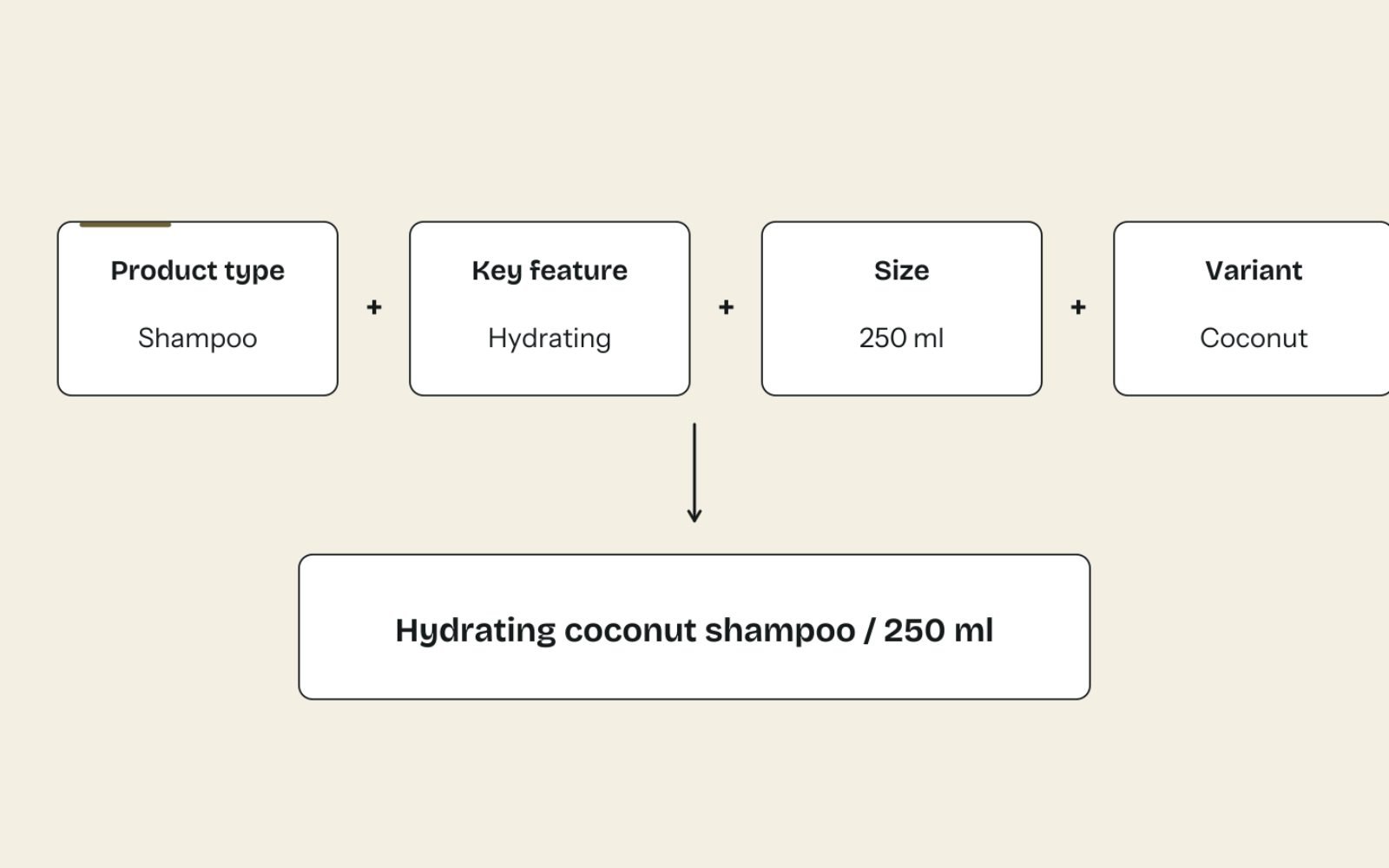
The product name is the most valuable text on the page. It usually becomes your H1, the start of your title tag and the basis of your Merchant Center feed title, so get it right once and reuse it.
The formula I use
For most products, the order is: product type + key attribute + size or quantity + variant, with the brand at the front if people search for the brand. Internal names, marketing nicknames and SKU codes go nowhere near the start.
| Category | Formula | Before | After |
|---|---|---|---|
| Meat | Cut + form + key attribute + weight | The Pitmaster Special | Whole Beef Brisket, Packer Cut, Grass-Fed, 5–6 kg |
| Fitness | Brand + product type + range + pack size | FlexBell Pro | [Brand] Adjustable Dumbbells, 2.5–24 kg, Pair |
| Skincare | Brand + product type + key ingredient + size | Dew Drops | [Brand] Hydrating Face Serum with Hyaluronic Acid, 30 ml |
| Coffee | Origin + product type + roast + weight | Morning Ritual | Ethiopia Yirgacheffe Coffee Beans, Light Roast, 1 kg |
| Homewares | Product type + material + size + colour | The Byron | Linen Duvet Cover, Queen, Sage Green |
Notice that the "after" titles still keep personality available elsewhere. If your brand loves the name "The Pitmaster Special", use it as a subheading or in the description. Just don't make it the only words a search engine and a shopper see first.
Title tag, H1 and feed title: three versions
- H1: the clean product name, as above.
- Title tag: the product name plus one modifier that wins the click, such as "Buy Online" or a delivery area, then your store name if space allows. Google doesn't publish a character limit, but it truncates long title links to fit the device and sometimes rewrites them, so put the important words first.
- Feed title: a longer, attribute-rich version for Google Shopping, which I cover in the companion piece on fixing Merchant Center disapprovals.
Before you publish, run the title and meta description through a free title and meta description checker to see how they'll look in results and catch truncation early.
Write a description that answers questions in order

A good product description is a structured answer, not a paragraph of adjectives. I use the four buckets from the research step as the skeleton.
- Opening summary (2–3 sentences): what the product is, who it suits and the one thing that sets it apart.
- Key facts block: a short list of the specs buyers compare, such as weight, dimensions, materials, origin, serves or fits.
- How to use it: cooking, setup, sizing or care guidance, written for a first-time buyer.
- What's included: pack contents, number of pieces, accessories.
- Delivery and returns summary: one or two lines with a link to the full policy.
Before and after: a real-world style rewrite
Here's the kind of supplier copy I see on thousands of stores, followed by the rewrite I'd write. The product is a whole beef brisket.
Before:
Premium quality brisket, perfect for any occasion. Sourced from
the finest farms, this delicious cut will impress family and
friends. The best brisket in Australia. Order now!
After:
A whole packer-cut brisket with the point and flat still joined,
for low-and-slow smoking or oven braising. It suits backyard
smokers cooking for 12 to 15 people.

Key facts
- Weight: 5 to 6 kg (priced by the piece, not per kg)
- Cut: point and flat, fat cap left on
- Origin: grass-fed, Queensland
- Packed: vacuum sealed, delivered chilled

How to cook it
Trim the fat cap to about 6 mm. Smoke at 110 to 120 °C (230 to
248 °F) until the thickest part reaches about 95 °C (203 °F) and
probes like soft butter, usually 10 to 14 hours.

Storage
Keeps in the fridge until the use-by date on the label, or freeze
on arrival for up to 6 months.

Delivery
Chilled delivery to the metro areas listed on the delivery page.
The "after" version is longer, but every line answers something a brisket buyer asks. It also gives search engines and AI tools specific, quotable facts: weight, cut, origin and a cooking method. Your own facts will differ, so only include details you can confirm with the supplier or from your own handling.
How long should it be?
Long enough to answer the questions in your four buckets, and no longer. A pack of batteries might need 80 words. A smoker, a mattress or a whole primal of beef might need 400 to 600. Length isn't the target; coverage of real questions is.
What to leave out of a product page

Most product pages I audit don't need more words. They need fewer of the wrong ones. Google's guidance on helpful, people-first content asks whether a page offers original information and value, and these are the habits that fail that test.
| Leave out | Why it hurts | Write instead |
|---|---|---|
| Manufacturer or supplier descriptions copied word for word | The same text appears on many other stores, so your page adds nothing new and competes as a near-duplicate | Your own summary, facts block and usage notes |
| "Best in Australia", "world's finest", health or performance claims | You can't prove them, and unproven claims create legal and trust risk | Specific, checkable facts: grade, origin, test results you hold |
| Keyword lists and repeated phrases | Reads as spam to people and adds no meaning for search engines | One natural mention of the main term, plus related words buyers use |
| The full shipping and returns policy pasted on every product | Hundreds of identical blocks bloat pages and bury the product facts | A one-line summary near the price, with a link to the policy page |
| Stock or price wording inside the description ("only 3 left!") | It goes stale and can contradict the live price or stock | Let the platform show price and availability dynamically |
| Internal jargon and SKU codes in the opening line | Buyers don't search for them | Put SKU and model numbers in the facts block |
On claims, Australian stores have an extra reason to be careful. The ACCC states that businesses must be able to back up the claims they advertise, and product page copy is advertising. If you can't prove "best", "healthiest" or "eco-friendly", leave it out.
Handle variants, near-duplicates and out-of-stock products
Variants and discontinued products cause more duplicate and thin-page problems than anything else on a typical store. A few decisions up front prevent most of them.
Variants: one page, selectable URLs
If the only difference between items is size, colour or weight, I keep them on one product page with a variant selector. Reviews, links and history stay in one place instead of being split across near-identical pages.
Google's documentation on product variant structured data supports this setup: a ProductGroup with the shared details, a hasVariant entry for each option, and a distinct URL (usually a query parameter such as ?variant=) that preselects each variant with the right image, price and availability. Shopify's default variant URLs already work this way.
Split variants into separate pages only when they're genuinely different products that people search for separately, such as a 1 kg bag and a 25 kg wholesale sack aimed at different buyers.
Near-duplicate products
If you sell five products that differ by one word, write the facts block carefully so each page states its own difference in the first line. When two pages really are the same product, merge them and redirect the weaker URL to the stronger one.
Out-of-stock and discontinued products
- Temporarily out of stock: keep the page live, show the correct availability, and offer a back-in-stock alert or a close alternative.
- Permanently discontinued, with a close replacement: 301 redirect to the replacement product.
- Discontinued, no replacement: redirect to the most relevant collection, or let it return a 404 if nothing related exists.
Add the structured data Google uses for products

Structured data doesn't make a weak page rank, but it helps Google show your price, stock, shipping and returns in results. For pages where people can buy directly, Google's merchant listing structured data requires a Product with a name, image and an offer that includes a price and currency.
The same documentation lists shipping details, return policy, GTIN, brand, ratings and reviews as recommended. It also lets you declare a standard shipping and returns policy once at Organization level, and override it on a product only when that product differs.
Here's a trimmed example for the brisket above. Every value must match what's visible on the page.
{
  "@context": "https://schema.org",
  "@type": "Product",
  "name": "Whole Beef Brisket, Packer Cut, Grass-Fed, 5–6 kg",
  "image": "https://www.example.com/images/whole-brisket.jpg",
  "description": "A whole packer-cut brisket for low-and-slow smoking.",
  "sku": "BRSK-WHL-56",
  "brand": { "@type": "Brand", "name": "Example Meats" },
  "offers": {
    "@type": "Offer",
    "url": "https://www.example.com/products/whole-beef-brisket",
    "price": "189.00",
    "priceCurrency": "AUD",
    "availability": "https://schema.org/InStock",
    "itemCondition": "https://schema.org/NewCondition"
  }
}
Most Shopify themes output basic Product markup already. Test a live product URL in the Rich Results Test, then watch the Merchant listing report under Shopping in Search Console for errors across the whole catalogue. If you want the bigger picture on markup, I explain which schema types help AI search and which are noise.
One warning: the price and stock in your markup, on the page and in your Google Merchant Center feed must agree. When they don't, products get disapproved in Shopping, which is the most common issue I fix in feeds.
Add the elements that convert and also help rankings
Some page elements do double duty: they lift conversion rate and give search engines more useful content. I add these in order of impact.
- Delivery and returns line next to the price. "Chilled delivery Tuesday to Friday, metro areas" removes the biggest doubt at the moment of decision.
- Genuine reviews. Real reviews add fresh, buyer-written text that covers questions you didn't think of. Never write or edit them yourself.
- An FAQ block from real questions. Three to five product-specific questions, not a generic block pasted across the store.
- Useful images with descriptive alt text. Show scale, packaging and the product in use. Alt text should describe the image, such as "Raw whole brisket on a board next to a 30 cm ruler".
- Links to the parent collection and a buying guide. These help people compare and help search engines understand where the product sits. Pair this with strong collection page content so the two page types support each other.
If the page gets traffic but few add-to-carts, the problem is usually layout, trust or price clarity rather than SEO. That's where conversion rate optimisation testing comes in, using the same buyer questions as the brief.
How to measure whether a rewrite worked
I measure every product page rewrite against its own past, not against a target someone guessed. Compare the 28 days after the change with the 28 days before, and allow for seasonality and promotions.
| Metric | Where to find it | What good looks like |
|---|---|---|
| Impressions and number of ranking queries | Search Console, Performance, filtered to the page | More queries, including long-tail ones that match your new facts |
| Click-through rate | Search Console, same filter | Higher CTR at a similar position, a sign the title is working |
| Average position for the main keyword | Search Console or a rank tracker such as Ahrefs or Semrush | Steady or improving over 4–8 weeks |
| Add-to-cart and purchase rate | GA4 eCommerce reports or Shopify analytics | Higher conversion from the same traffic |
| Merchant listing errors | Search Console, Shopping, Merchant listing | Zero errors on the page |
Which pages to rewrite first
- High impressions, low CTR: fix the title and meta description first. It's the fastest win.
- High traffic, low conversion: fix the description, delivery line and reviews.
- Best sellers with supplier copy: rewrite in full, because they carry the most revenue risk.
- Low traffic, low sales: leave until last, or consider whether they belong in the catalogue.
On Carnivore Society’s product pages, 176 product pages were published or refreshed, and product and collection copy was corrected so every claim matches what the business can back up. That discipline, applied across the whole catalogue rather than any single page, is what makes product pages trustworthy to shoppers and search engines alike. Your starting point and competition will differ, which is why I prioritise from your own Search Console data.
The bottom line
Write for the buyer's questions first. Specific titles, a clear facts block and honest copy help shoppers decide and give search engines something worth ranking.
Then cut what doesn't help, keep variants together and make sure your page, markup and feed all agree.
If you'd like your best sellers rewritten from proper briefs, my product page copywriting service covers research, rewrites and the measurement afterwards.
FAQs
1. How long should a product description be for SEO?
There's no ideal word count. Write enough to answer the questions buyers ask about fit, facts, use and risk. Simple products may need under 100 words, while complex or expensive products often need 400 words or more.
2. Can I use the manufacturer's product description?
You can, but it gives your page no advantage over every other store using the same text. Use the manufacturer's specs as source facts, then write your own summary, usage notes and buying advice around them.
3. Should each product variant have its own page?
Usually not. If variants differ only by size, colour or weight, keep them on one page with a distinct URL for each selected variant and ProductGroup markup. Split them only when people search for them as different products.
4. What should a product page title tag include?
The product type and the attributes people search for, such as brand, size or material, with the most important words first. Add your store name at the end if there's room. Keep it specific and avoid stuffing several keywords in.
5. Do product reviews help SEO?
Genuine reviews add fresh, buyer-written content that often covers questions your description misses, and they build trust that lifts conversion. Review data can also be included in Product structured data as a recommended property.
6. What should I do with out-of-stock product pages?
Keep temporarily out-of-stock pages live with accurate availability and an alternative. For discontinued products, redirect to a close replacement or the most relevant collection, and only let the page return a 404 when nothing related exists.