
In its first 30 days of local SEO, a brick-and-mortar shop should verify and complete its Google Business Profile, make its website match that profile exactly, clean up its main listings and start asking every customer for a review. That foundation is what everything else builds on.
Content, links and extra pages come later. They work far better once Google and your customers can trust your basic details.
Below is the week-by-week plan I use for a single-location shop, with the exact tasks, a template for your business details and the numbers to check at the end of the month.
Key takeaways
- Write down one master version of your name, address, phone and hours before you touch anything, and use it everywhere.
- Week 1 is the Google Business Profile: claim, verify and complete every relevant field.
- Week 2 makes the website match the profile and adds LocalBusiness structured data.
- Week 3 fixes the listings customers actually use, starting with the maps apps.
- Week 4 starts a review routine and your first profile post, then you measure.
What actually moves local rankings for a shop

Before you start, it helps to know what you can and can’t influence. Google explains that local results are based mainly on relevance, distance and prominence, and that there’s no way to pay for a better local ranking.
- Relevance is how well your profile matches the search. Complete, accurate details and the right categories help here.
- Distance is how far you are from the person searching. You can’t change it, which is why a shop rarely ranks across a whole city.
- Prominence is how well known you are, based partly on links to your website and on your reviews.
The first month targets relevance and lays the groundwork for prominence. That’s also how I structure the first month of my Local SEO service, adjusted to what each shop already has in place.
Day 0: gather your facts and a baseline
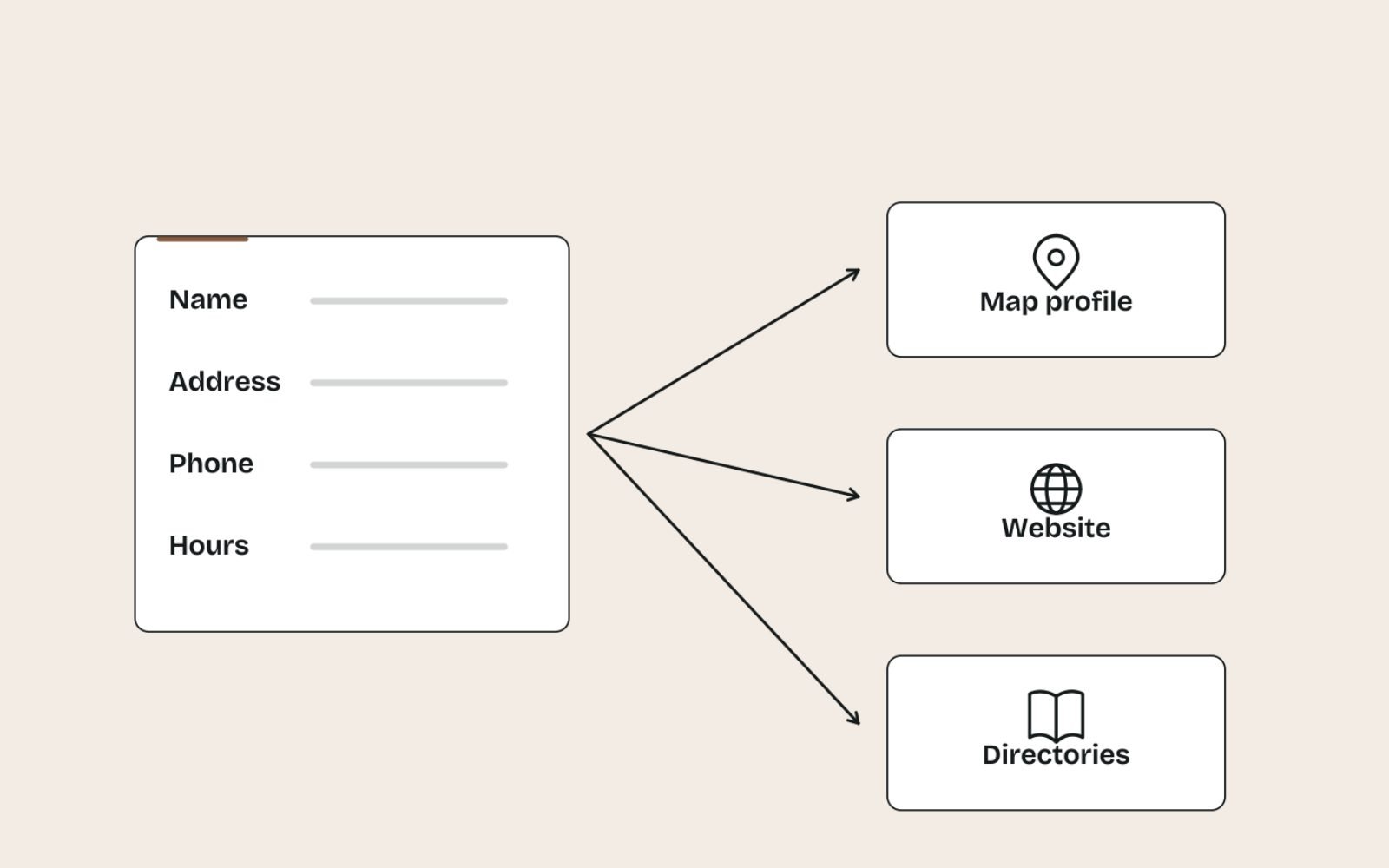
Spend an hour on this before week 1. Many local SEO problems start with small inconsistencies, such as “Shop 2” on one site and “2/” on another, or an old phone number nobody remembers listing.
Write a master business record
Create one document with the exact version of every detail. Everyone who edits a listing, including you, copies from it.
Business name:   Northside Cycles
Address:         Shop 2, 145 Example Road, Fitzroy VIC 3065
Phone:           (03) 9000 0000
Website:         https://www.example.com.au/
Hours:           Mon-Fri 9:00-17:30, Sat 9:00-16:00, Sun closed
Primary category: Bicycle shop
Secondary:        Bicycle repair shop
Description (short): Independent bike shop in Fitzroy selling commuter,
                 road and kids' bikes, with a full repair workshop.
Record a baseline
- Note current Google Search Console clicks and impressions for the last three months, if the site is set up.
- Export Business Profile performance if a profile already exists.
- Search your main terms, such as “bike shop Fitzroy” and “bike repairs near me”, from the shop and note where you appear. Results are personalised, so treat it as a rough snapshot.
- Count your current reviews and average rating.
Week 1: claim, verify and complete your Google Business Profile
Your Business Profile is where most local customers will first see you, in Google Maps and the map pack. Get it right before anything else.
Claim or create the profile
Search Google Maps for your shop name and address first. If a profile already exists, request access rather than creating a new one, because Google’s guidelines for representing your business allow only one profile per location.
Verify it
Google chooses your verification method, which may be a video recording, a live video call, a phone or text code, email or a postcard. For a video, show the street, your signage, the shop interior and something that proves you run it, such as keys or the till.
If you get a postcard, it usually arrives within 14 days. Don’t change the name, address or category while you wait, or the code won’t work.
Complete every relevant field
- Categories: pick the primary category that completes “this business IS a”, then add only the secondary categories that are also true. A bike shop with a workshop might use a bike shop category plus a repair category.
- Hours: your real customer-facing hours, plus special hours for public holidays.
- Description: up to 750 characters about the shop, with no links, prices or promotions, as Google’s help on editing your profile sets out.
- Products and services: add your main product ranges and services with short descriptions.
- Photos: the shopfront from across the street, signage, the interior, your best-selling products and the team. The shopfront photo helps people recognise you on arrival.
- Attributes: tick the ones that genuinely apply, such as wheelchair access or payment options.
- Website link: add UTM tags, for example
?utm_source=google&utm_medium=organic&utm_campaign=gbp-listing, so profile visits show up separately in GA4.
The name must be your real-world shop name with nothing added. I go through the name, category and practitioner rules in more depth in a practical Google Business Profile setup written for law firms, and the same rules apply to shops.
Week 2: make your website match the profile
Your website is the fuller version of your profile. When the two agree, customers and search engines can trust both.
Put your details on every page
Add the name, address, phone and hours to the footer, copied character for character from the master record. Use text, not an image, so it can be read, copied and tapped to call on mobile.
Build a proper visit page
Create or improve a contact or “visit us” page with a map embed, directions from the nearest landmark or station, parking options, accessibility notes and opening hours. A photo of the shopfront from the street helps first-time visitors.
If you have more than one shop, each one needs its own page. My advice on writing local landing pages covers what to put on them.
Fix titles on key pages
Your home page title should say what you are and where, for example “Northside Cycles | Bike Shop and Repairs in Fitzroy”. Keep it natural and don’t repeat the suburb.
Add LocalBusiness structured data
Google’s LocalBusiness structured data documentation lists name and address as required, recommends properties such as telephone, URL and opening hours, and asks you to use the most specific subtype. For a bike shop, schema.org has BikeStore:
<script type="application/ld+json">
{
  "@context": "https://schema.org",
  "@type": "BikeStore",
  "name": "Northside Cycles",
  "url": "https://www.example.com.au/",
  "telephone": "+61 3 9000 0000",
  "address": {
    "@type": "PostalAddress",
    "streetAddress": "Shop 2, 145 Example Road",
    "addressLocality": "Fitzroy",
    "addressRegion": "VIC",
    "postalCode": "3065",
    "addressCountry": "AU"
  },
  "openingHoursSpecification": [{
    "@type": "OpeningHoursSpecification",
    "dayOfWeek": ["Monday", "Tuesday", "Wednesday", "Thursday", "Friday"],
    "opens": "09:00:00",
    "closes": "17:30:00"
  }]
}
</script>
Check the markup with Google’s Rich Results Test or the Schema Markup Validator, and update it whenever your hours change.
Check mobile speed
Most local searches happen on phones, often on the move. Run your home and visit pages through PageSpeed Insights and fix anything obvious, using my notes on Core Web Vitals to prioritise.
If the site has deeper problems, such as pages that can’t be indexed, work through a technical SEO audit checklist before adding new content.
Week 3: fix your listings and citations

Customers find shops through more than Google. Week 3 makes sure the other places they look show the same, correct details.
- Search your business name, old phone numbers and any previous addresses. Note every listing that shows up.
- Claim and update the major maps platforms first: Apple Business Connect controls how you appear in Apple Maps, and Bing Places can import your details from Google Business Profile.
- Update your Facebook and Instagram profiles, since many people check them before visiting.
- Fix the main general directories in your country and the key directories for your industry.
- Ask local organisations that list you, such as a business association or shopping strip website, to correct old details.
| Listing | Why it matters | Priority |
|---|---|---|
| Google Business Profile | Google Search and Maps | Done in week 1 |
| Apple Business Connect | Your place card in Apple Maps on iPhones | High |
| Bing Places | Bing and Microsoft products | High, and quick with the import option |
| Facebook and Instagram | Customers check hours and photos there | High |
| Industry directories | Relevant referrals and links | Medium |
| General directories | Consistency and occasional referrals | Medium to low |
Don’t pay for hundreds of low-quality directory submissions. A handful of accurate, relevant listings beats a long list nobody visits.
Week 4: start reviews and your first profile posts
With the foundations in place, week 4 starts the habits that build prominence over the following months.
Start a review routine
Get your review link or QR code from the profile, then ask every customer at the same moment, such as at the counter after a purchase or when a repair is collected. Never offer discounts or gifts for reviews, and never ask only the customers you think are happy.
The full routine, with message templates and reply examples, is in my review request process for local businesses.
Publish your first profile posts
Publish one or two posts: a new product range, a seasonal service or an in-store event. Link each one to the matching page on your site with a UTM tag such as utm_campaign=gbp-post.
Reply to every existing review
Go back through your existing reviews and reply to each one, starting with the most recent. Keep replies short and specific, and handle complaints calmly with an offer to talk directly.
How to measure your first month

Thirty days is enough to confirm the set-up works, but not enough to judge the full effect. Profile changes can show quickly; rankings in competitive areas take longer, and I don’t promise timelines.
Check these at the end of the month and compare them with your Day 0 baseline:
| Metric | Where to find it | What to look for |
|---|---|---|
| Calls, website clicks, directions | Business Profile, Performance | Counts recorded and trending, even from a low base |
| Search terms | Business Profile, Performance, Searches | Product and service terms, not just your shop name |
| Profile visits to the site | GA4, Traffic acquisition, Session campaign “gbp-listing” | Sessions and key events arriving with the tag |
| Local search impressions | Search Console, Performance | Queries including your suburb or “near me” |
| Reviews | Business Profile | New reviews since Day 0, and every one replied to |
Google’s help on Business Profile performance notes that search terms update at the start of each month, so don’t worry if that report lags.
You can also bring the profile metrics into GA4 through Admin, then Product links, then Google Business Profile links. Google’s help on connecting Business Profile to Analytics says the data covers only the last six months, so keep your own monthly export as well.
Finally, ask customers how they found you for a few weeks. A simple tally at the counter adds the context that dashboards can’t.
What to do after day 30
The first month builds the base; the months after build momentum. This is the routine I suggest once the foundations are in place:
- Weekly: reply to new reviews and check the profile for edits you didn’t make.
- Monthly: publish a post or two, add new photos, review the metrics and update special hours ahead of holidays.
- Quarterly: refresh product and service pages, and check your main listings for drift.
- Ongoing: earn mentions and links from local organisations, suppliers, events and community groups. My approach to earning backlinks works well for local shops.
Every shop has its own challenges, such as a crowded shopping strip, a hard-to-find entrance or a niche product range, so the later months should focus on whatever is holding yours back.
Common first-month mistakes
- Creating a second profile instead of claiming the existing one.
- Adding keywords to the business name, which breaks Google’s guidelines.
- Editing details mid-verification and invalidating the postcard code.
- Inconsistent details between the profile, website and listings.
- Buying reviews or offering rewards for them, which can get reviews removed and the profile restricted.
- Judging success in week 2. Give the work time and judge it on calls, visits and sales.
The bottom line
Get the basics right, then stay consistent. An accurate profile, a matching website, clean listings and a steady review routine put a shop in a strong position.
None of it is complicated, but it is detailed, and small inconsistencies add up.
If you’d rather hand the first month over, my one-off Local SEO set-up covers these 30 days for you.
FAQs
1. How long does local SEO take to work for a shop?
Profile improvements can show within weeks, especially if the profile was incomplete before. Rankings in competitive areas usually take several months of consistent work, and nobody can guarantee a timeline. Track calls, website clicks and direction requests monthly.
2. Do I need a website for local SEO?
You can have a Business Profile without one, but a website makes local SEO much stronger. It holds the detail a profile can’t, and links to your website are part of how Google judges prominence.
3. What is NAP consistency?
NAP stands for name, address and phone number. Consistency means those details are written identically on your profile, website and listings, so customers and search engines don’t find conflicting information.
4. Do I need a blog for local SEO?
Not to start. Accurate details, a strong profile and good product and service pages come first. A blog becomes useful later if it answers real questions your customers ask.
5. How many reviews does a local shop need?
There’s no magic number. A steady flow of recent, genuine reviews, each with a reply, matters more than a big total. Compare yourself with the shops that appear alongside you in local results.
6. Should I pay for a citation-building service?
Usually not in the first month. Fix the major maps platforms, social profiles and a few relevant directories by hand. Bulk submissions to low-quality directories rarely help and can create more inconsistent listings.